Optimisation & Sustainability
Improve repeatability and reduce wasted time and material.
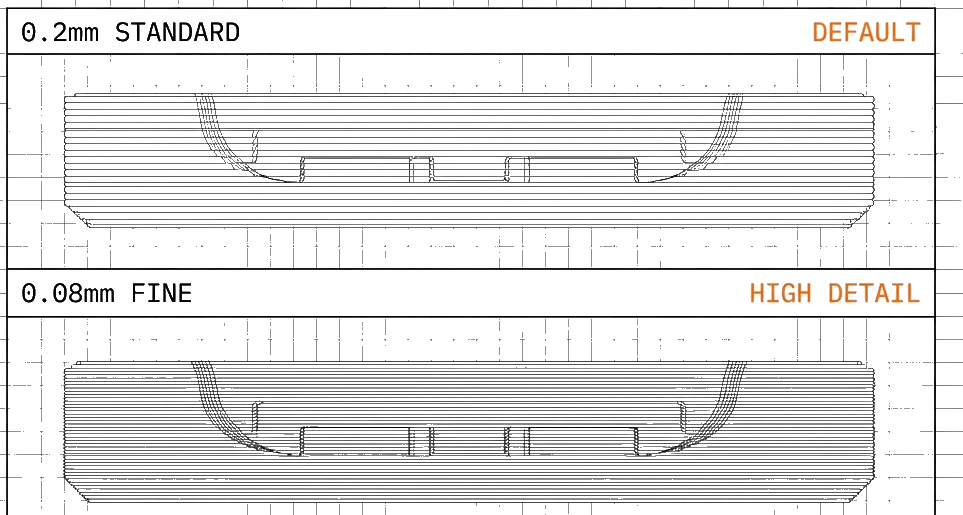
How can I reduce print time without losing the result?
Speed without sacrificing quality requires understanding the trade-offs. Not all time savings are worth the quality cost.
High-Impact Speed Optimisations
Layer Height
HIGH IMPACTDoubling layer height roughly halves print time. Use 0.2mm for functional parts, reserve 0.12mm for visible surfaces.
Infill Strategy
HIGH IMPACTMost parts don't need 20% infill. Use 10-15% for decorative items, increase wall count instead for structural strength.
Print Speed
MODERATE IMPACTModern printers handle 150-200mm/s for inner walls. Keep outer walls slower (60-80mm/s) for quality.
PRINCIPLE
Optimise for what matters. Internal geometry can be fast; external surfaces determine perceived quality. Use variable settings strategically.
What does a successful print actually cost?
Material efficiency and waste reduction lower per-part costs while improving sustainability.
Nesting & Batching
Print multiple parts per batch. Reduces per-part overhead (purge, heating, bed prep) and maximises machine utilisation.
Support Minimisation
Orient parts to reduce support material. Each gram of support is waste material and added print time.
Right-Size Materials
Use standard PLA for prototypes, engineering materials only when required. Material choice significantly impacts cost.
Recycled Materials
rPLA and rPETG offer comparable performance at lower cost with reduced environmental impact.
How can the next operator repeat a good print?
Consistent results across prints require systematic processes, not just good settings.
Building Reliable Processes
- 1Document Settings
Save working profiles. Don't rely on memory for successful configurations.
- 2Control Environment
Temperature and humidity affect prints. Use enclosures for sensitive materials.
- 3Standardise Materials
Stick to proven suppliers. Material variation is a hidden source of inconsistency.
- 4Maintain Equipment
Regular maintenance prevents drift. Calibrate on schedule, not when problems appear.
Where can I reduce material waste?
Responsible 3D printing balances capability with environmental consideration.
The ECO System
Our closed-loop sustainability program: reusable spools, recycled materials, and filament take-back.
Learn About ECOECO Spool 2 Refills
How to load refill coils onto your reusable spool system. Reduce plastic waste per kilogram of filament.
View GuideWaste Reduction Hierarchy
How does maintenance protect repeatability?
Regular maintenance prevents degradation and extends equipment life. Schedule maintenance, don't wait for problems.
Maintenance Intervals
| Task | Frequency | Impact |
|---|---|---|
| Nozzle inspection | Weekly | Extrusion quality |
| Belt tension check | Monthly | Dimensional accuracy |
| Lubrication | Monthly | Smooth motion |
| Full calibration | Quarterly | Overall accuracy |
Calibration Schedule
Preventative Over Reactive
Schedule calibration before quality degrades. A well-maintained machine produces consistent results and has fewer emergency repairs.
Need Professional Service?
Our service team handles repairs, maintenance, and calibration for all major printer brands.
View Service OptionsLearn on your own equipment.
Practise setup, slicing and printing with a trainer.