Level 1Understand the technology
Printer · A clean, flat & level surfaceYour next step
What is 3D printing useful for?
Explain what 3D printing changes, and identify a sensible reason to use another process.
Begin with the job, not the machine
A teacher needs a tactile model for a lesson. A workshop needs a jig that holds an awkward component. A designer wants to check whether a proposed handle feels comfortable. These are useful starting points because each names a problem a physical object could solve. The first question is what the object must help someone do. Only then decide whether printing is an appropriate way to make it. Owning a printer does not make every project a printing project, and requesting a print does not require you to operate the machine.
A digital shape becomes a physical object
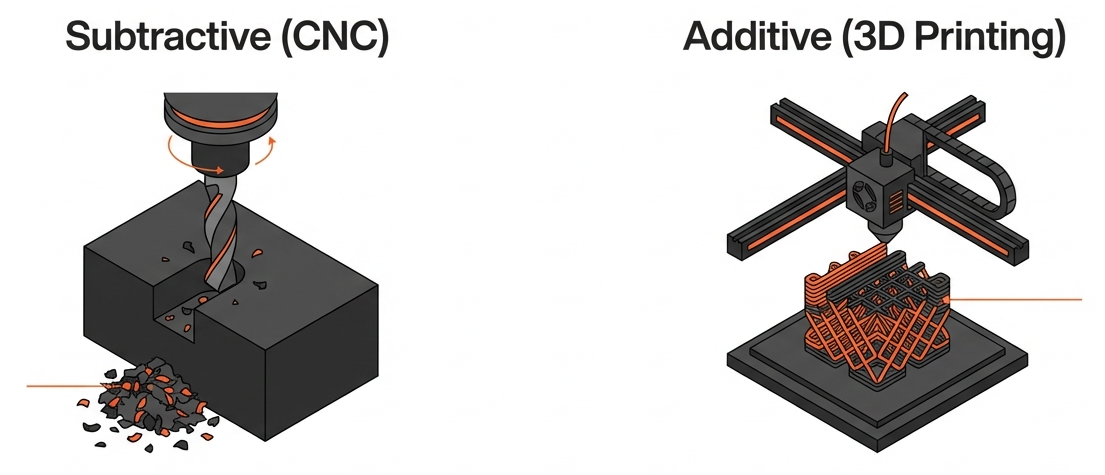
3D printing is often called additive manufacturing. A machine forms an object from digital model data by adding or joining material, usually in successive layers. Different processes use different input materials and ways of forming those layers. A desktop filament printer is one example, not a description of the whole field. The model describes the intended shape, but the finished result also depends on the material, manufacturing process and preparation. Think of the file as a design to be made under particular conditions, rather than a promise that any printer will produce an identical object.
Compare adding, removing and forming
Machining removes material from stock; moulding gives material the shape of a tool; sheet fabrication cuts or forms sheet into components. These methods can sit alongside printing in the same project. A printed mock-up might help refine a design before a production tool is commissioned. A machined insert might provide a required interface inside a printed assembly. Buying an existing component can be the best decision when a suitable one already exists. Compare the complete route to a useful object, including preparation and assembly, rather than declaring one manufacturing method universally better.
| Route | A useful reason to consider it | Question to ask |
|---|---|---|
| 3D printing | A custom shape or a design still changing | Can the process meet the required function and finish? |
| Machining or sheet fabrication | Stock material, a simple profile or a demanding interface | Can the features be reached and made economically? |
| Moulding | A stable design intended for repeated production | Does the expected quantity justify the tooling? |
| Buy an existing part | A suitable, documented component is available | Does it meet the actual requirements without redesign? |
These are starting questions, not fixed cost or quantity thresholds. A supplier may combine processes.
Separate a model, a prototype and a working part
A display model communicates an idea. A prototype answers a question, such as whether two components fit together. A working part performs its intended job in service. The same shape can appear in all three categories while requiring different materials, evidence and inspection. A handle printed to review appearance has not thereby been shown suitable for repeated loading. State which role the object will have, and what decisions it should support. This distinction helps a supplier quote the right work and prevents a successful demonstration being mistaken for approval to use the part.
Understand the attraction and the limits
Printing can make a design change practical without first making a new mould, and can help produce forms that would be awkward to assemble from simpler pieces. That flexibility is valuable when it serves the job. It does not remove limits on size, material behaviour, accessible features or finishing. Extra material may be used for supports, preparation and unsuccessful attempts, so additive does not mean zero waste. A queue, design revision or finishing stage can also dominate delivery time. Ask what is included between the initial request and the accepted part in your hands.
Practise deciding whether to investigate
Imagine a department requests personalised model holders for several different classroom activities. Their changing shapes make printing worth investigating. Now imagine it needs a large quantity of identical flat labels that can be bought or cut from sheet. Printing may still be possible, but possibility is not the reason to select it. Compare cost, timing and the educational purpose before deciding. Your Level 1 role is to frame that comparison, ask useful questions and recognise missing evidence. The later operator lessons teach how an authorised person prepares and runs an appropriate print.
A reading marker for you. Passing the checks below unlocks the next lessons.