Foundations of 3D Printing
Three rules and four variables. A starting point for understanding every print.
The three cardinal rules
These are the rules we return to in our teaching. Start here before chasing individual settings.
RULE 01
Right material. Right condition. Right temperature.
A material must suit both the part and the printer. Moisture can affect extrusion and the finished part. Dry and store filament as its maker recommends; check the spool and dryer limits too. Nozzle, bed and enclosure conditions depend on the material and machine.
Material choice & careRULE 02
Start with a clean and level build plate.
Remove contamination using the plate maker’s cleaning method. Check that the plate is seated correctly and run the machine’s levelling procedure when required. Automatic levelling does not remove grease or fix a damaged surface. Watch the first layer before relying on the rest of the print.
Check the first layerRULE 03
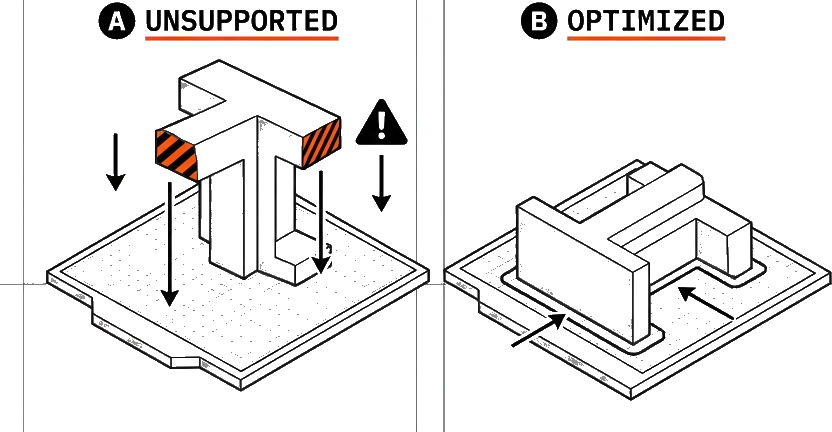
You cannot print over air.
A short bridge can span between supported ends, and a gradual overhang can rest partly on the layer below. Neither means an isolated feature can start in mid-air. What works depends on the shape, material, cooling and settings. Inspect the layer preview; rotate the part or add removable supports where needed.
Orientation & supports
What you need to understand
You can learn the foundations without operating a printer. Be able to explain how a file becomes a part, name the four variables below, and use the three rules to question a setup. Hands-on operation starts in Level 2 training.
What is 3D printing?
3D printing builds a part from a digital model, layer by layer. Machining removes material; printing adds it.
It is useful for prototypes, custom parts and complex shapes. The design still needs to suit the printing process and the job the part must do.
How does a 3D file become a printed part?
In filament printing (FFF or FDM), the printer heats plastic until it flows through a nozzle. It lays down a path, then builds the next layer on top.
- 01
Model
Define the shape
- 02
Slice
Plan the layers
- 03
Instructions
Tell the printer how to move
- 04
Print
Deposit the material
- 05
Inspect
Check the finished part
Temperature, movement and cooling affect how the lines form and bond. A good model alone does not guarantee a good print.
What changes the result of a 3D print?
File
Shape, dimensions and features. Can the chosen process make them?
Explore fileMaterial
Properties, condition and compatibility. Will it suit the part and the printer?
Explore materialMachine
Nozzle, plate, motion and temperature capability. Is the setup ready?
Explore machineSettings
Orientation, toolpaths, temperature and cooling. Do they match the real setup?
Explore settingsHow do filament, resin and powder printing differ?
FFF / FDM: filament
A heated nozzle deposits thermoplastic. The material, nozzle, plate and environment must be compatible.
SLA / DLP: resin
Light cures liquid resin. Washing, curing and chemical handling are part of the process.
SLS: powder
A laser fuses polymer powder. Surrounding powder supports the part during printing; powder handling and finishing come afterwards.
These foundations focus on filament printing. Do not transfer its operating instructions to resin or powder equipment.
Why can the same model fail to print?
A visible fault can have several causes. Record what you see before deciding why it happened.
- Lines do not stay on the plate
- Check the plate condition, setup and material. Stop a visibly failing start.
- Corners lift later
- Investigate contact and shrinkage as the part cools. A clean first layer does not rule out warping.
- Material stops or flows unevenly
- Record the symptom and any error. Follow the machine’s instructions; do not reach into a moving or hot printer.
- The finished part does not fit or perform
- Compare the result with the dimensions and requirements, then review the file, material and settings.
Diagnose a failed print: record the setup, choose one justified change, then compare the result. Stop and ask for help when a check exceeds your training.
Try the rules on a real decision
A classroom bridge model
A small model has a flat deck between two towers. Before printing, ask:
- Does the material suit a display model, and is it ready to print?
- Which faces can sit securely on the build plate?
- Can the deck bridge this gap on your setup, or should you rotate it, split it or add supports?
Now imagine the part carries a real load. Material choice, layer direction and testing matter more; a successful display print does not prove structural suitability.
Next: prepare a printSupporting references
Manufacturer examples support these principles. Follow the instructions for your own machine, plate and material.
Learn on your own equipment.
Practise setup, slicing and printing with a trainer.