Printer Setup & Execution
Prepare the machine, watch the first layer and check the finished print.
What should I check before starting a print?
A consistent pre-print routine prevents the most common print failures. These checks take minutes but save hours of wasted time and material.
Build Plate Clean
No fingerprints, dust, or residue from previous prints. Clean with IPA or appropriate cleaner for your surface type.
Filament Loaded Correctly
Filament feeding smoothly, no tangles on spool, correct material loaded for your print settings.
Nozzle Clear
No debris on nozzle tip, previous material purged if switching filaments.
Settings Verified
Correct temperature, speed, and support settings for your material and part.
Print Area Clear
No obstructions, adequate clearance for bed movement, enclosure closed if required.
EFFICIENCY TIP
Make this checklist a habit, not a chore. Experienced operators complete these checks in under 60 seconds. The time investment prevents hours of troubleshooting.
How does the build surface affect adhesion?
Your build plate is the foundation of every print. Different surface types require different care to maintain optimal adhesion.
| Surface Type | Cleaning Method | Lifespan Indicator |
|---|---|---|
| PEI Smooth | IPA wipe, occasional acetone | Visible scratches, poor adhesion |
| PEI Textured | IPA wipe, avoid acetone | Worn texture, material build-up |
| Glass | Glass cleaner, IPA | Chips, coating wear |
| Specialty (High-Temp) | Per manufacturer guidelines | Surface degradation |
AVOID
Never use abrasive cleaners or scrape aggressively. Most adhesion issues are caused by contamination (fingerprints, oils) rather than surface wear.
What should a good first layer look like?
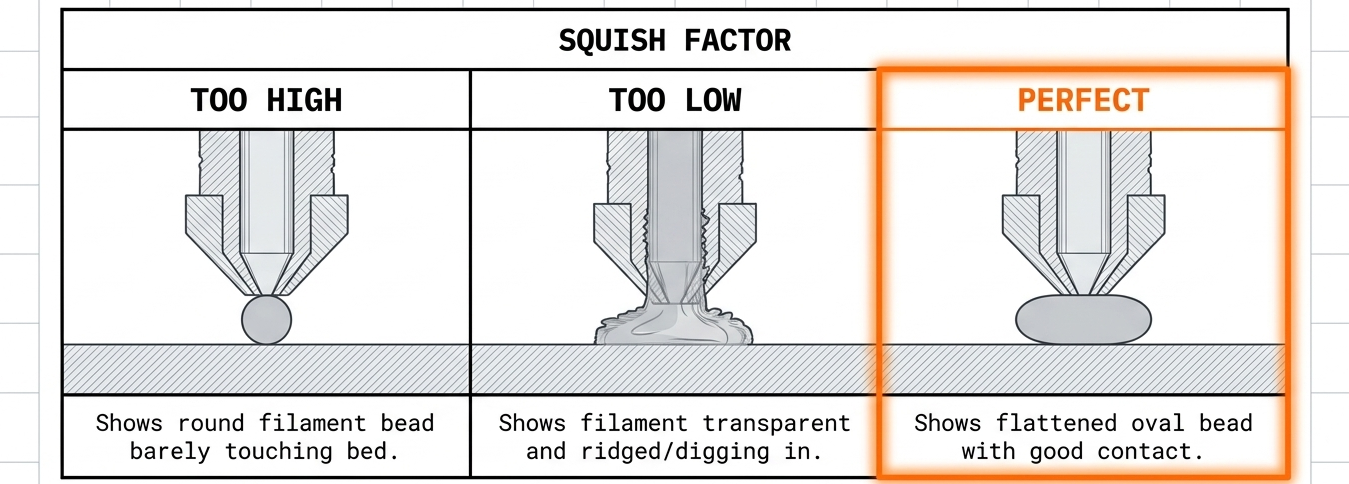
The first layer determines print success. Watch and validate before walking away.
First Layer Validation
✓ Good First Layer
- • Lines slightly squished, not rounded
- • No gaps between lines
- • Consistent width throughout
- • Adheres when poked gently
✗ Bad First Layer
- • Round or tube-like lines (too high)
- • Transparent or squashed flat (too low)
- • Lifting corners or edges
- • Inconsistent line width
Abort Criteria
Stop the print immediately if you observe:
- First layer not adhering within the first 2-3 lines
- Nozzle scraping or gouging the build plate
- Filament not extruding or under-extruding significantly
- Strange noises (grinding, clicking, scraping)
BEST PRACTICE
Watch the entire first layer complete before leaving. For long prints, set up remote monitoring (camera) to catch failures early.
When is a print ready to remove?
Proper removal technique protects both your print and your build plate.
Wait for Cooling
Most prints release naturally as the bed cools. PLA: ~40°C, PETG: ~50°C. Rushing removal risks damage to both print and plate.
Flex Plates
Remove plate from bed, flex gently to pop print free. Start from corners, not the center.
Stubborn Prints
Cool completely in freezer for 10 minutes. Thermal contraction often releases stuck prints without force.
NEVER
Never use metal tools to pry prints from the build plate while hot. This damages both the print and the build surface.
Learn on your own equipment.
Practise setup, slicing and printing with a trainer.